Keira: The Elegant Display Font for Eye-Catching Typography
Typography is more than just choosing a font—it’s about making an impression. Keira is a display font that combines elegance with versatility, allowing designers and content creators to craft visually compelling projects with ease. Whether you're designing a logo, branding materials, product packaging, or magazine headers, Keira can elevate your text from ordinary to extraordinary. But like any powerful tool, using it effectively requires understanding its strengths and avoiding common pitfalls.
Why Choose Keira?
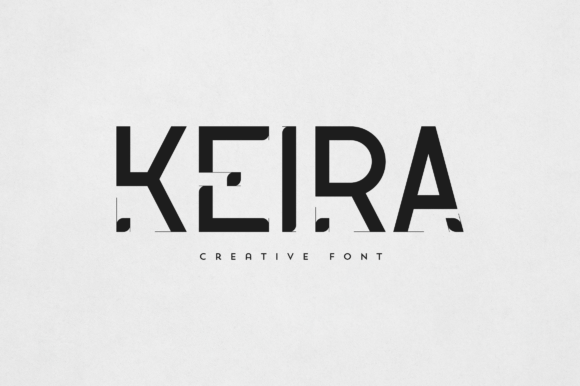
Keira stands out in the crowded world of typography because of its clean lines, balanced proportions, and unique character shapes. It has a modern yet timeless aesthetic that makes it suitable for both minimalist and bold designs. Unlike generic sans-serif fonts, Keira adds personality without overpowering the message, which is why it's particularly popular among creatives working on branding, editorial design, and digital overlays.
Its adaptability means it works well across different mediums—print, web, social media, and video. When used correctly, Keira can help your brand stand out by creating a visual identity that feels fresh and professional. For entrepreneurs and marketers, this can be especially valuable when trying to capture attention quickly and build trust through polished presentation.
Common Mistakes When Using Keira
Despite its beauty, Keira isn’t always the best choice for every project. Here are some mistakes people often make when selecting or applying it:
- Using it for body text: Keira is a display font, not a serif or sans-serif typeface meant for long paragraphs. Its ornate features can reduce readability at smaller sizes.
- Mixing too many styles: While Keira may come with variations (like bold or italic), overusing these can create a disjointed look. Stick to one or two styles per project to maintain harmony.
- Ignoring contrast with background images: Keira shines as a stylish overlay, but if the background is too busy or lacks sufficient contrast, the text can become lost or hard to read.
- Not considering licensing restrictions: Some users overlook the terms of use when downloading free versions of Keira, which might limit commercial applications or require attribution.
How These Errors Affect Your Work
Choosing Keira for the wrong context can lead to several issues:
- Reduced legibility: If used in small sizes or for lengthy copy, readers may struggle to process the information efficiently, leading to poor user experience.
- Inconsistent branding: Overuse of multiple styles can confuse the audience and dilute the brand message instead of reinforcing it.
- Design clutter: Pairing Keira with a complex background without adjusting opacity or color can result in a chaotic layout that fails to communicate clearly.
- Legal complications: Failing to understand the font’s license could land you in hot water if you’re using it for business purposes, such as marketing campaigns or product labels.
Best Practices for Using Keira
To ensure Keira enhances rather than hinders your design, consider the following tips:
Use Keira for Headlines and Key Visuals
Keira is ideal for headlines, taglines, logos, and other prominent text elements. Its bold presence ensures your message is noticed immediately. For example, if you're designing a poster for a boutique store, use Keira for the headline and pair it with a simple, readable font like Helvetica or Lato for body text.
Better approach: Use Keira for large, impactful text and complement it with a neutral supporting font. This maintains visual interest while ensuring clarity where it matters most.
Stick to One or Two Styles Per Project
Display fonts like Keira are often offered in various weights and styles. However, limiting yourself to one or two variations helps maintain a cohesive visual language. Too many styles can make your design feel unprofessional or disorganized.
Better approach: Select a primary style for your main headings and maybe one secondary style for subheadings or accents. Avoid switching between multiple styles unless you have a clear reason for doing so.
Enhance Contrast for Readability
When using Keira as an overlay on images, it’s crucial to adjust the font color, stroke, or background to ensure it remains legible. Dark backgrounds may call for light-colored text with a subtle outline, while bright or colorful images might need a solid backdrop behind the text.
Better approach: Always preview how Keira looks against the intended background. Add a drop shadow, outline, or semi-transparent fill if needed. Tools like Adobe Photoshop or online contrast checkers can help you fine-tune visibility before finalizing your design.
Review Licensing Terms Before Use
If you're using Keira for commercial work, take a moment to review the font’s licensing agreement. Many free fonts restrict their use in logos, products, or websites without purchasing a premium version. Ignoring these details could lead to unexpected costs or legal challenges down the line.
Better approach: Visit the official source where you downloaded or purchased Keira and read the license carefully. Consider investing in a full commercial license if you plan to use it extensively in business contexts.
What to Check Before Making a Decision
Before committing to Keira for your next project, ask yourself the following questions:
- Is this font appropriate for the medium I’m working on? (e.g., print, web, video)
- Will it remain legible at the size I intend to use it?
- Does it align with my brand’s tone and personality?
- Am I using it consistently throughout the design?
- Have I verified the licensing conditions for my specific use case?
Answering these questions honestly will help you avoid missteps and ensure that Keira contributes positively to your overall design strategy.
Realistic Examples of Keira in Action
Let’s explore how Keira can be applied in real-world scenarios:
Logo Design
A local bakery named “Sunrise Treats” wanted a logo that felt warm and inviting. They chose Keira for the main title due to its soft curves and elegant appearance. To keep the design balanced, they paired it with a classic serif font for the tagline and added a gentle gradient to the text for depth.
Product Packaging
An artisan candle company used Keira on their label to emphasize the brand name and key scents. By using a white background with a thin black outline around the text, they ensured high visibility even when printed on dark glass jars.
Magazine Headers
A lifestyle magazine featured Keira in their cover story titles. Because the font was only used for headlines and not for body text, it created a luxurious feel without compromising the reader’s ability to scan articles easily.
Alternatives to Consider
While Keira is excellent for many uses, there are times when another font might be better suited. For instance:
- For formal brands: Fonts like Playfair Display or Cinzel offer similar elegance but with a more traditional serif structure.
- For tech startups: A sleeker sans-serif such as Montserrat or Poppins may convey innovation more effectively.
- For handwritten aesthetics: Script fonts like Great Vibes or Allura could add a personal touch if Keira feels too structured.
Always evaluate the context and purpose of your design before settling on a font. Keira is a great option, but it shouldn't be chosen simply because it looks nice. It needs to serve the message and the medium.
Where to Get Keira and How to Learn More
If you’re ready to try Keira, you can find it on reputable font marketplaces like Adobe Fonts, Creative Market, or Google Fonts. Be sure to verify the seller’s credibility and compare pricing across platforms before purchasing.
Once you’ve acquired the font, spend some time experimenting with it in your preferred design software. Look at how it scales, how it pairs with other fonts, and whether it complements your brand’s colors and imagery.
You can also search for Keira font tutorials online to learn advanced techniques like layering, spacing, and customizing glyphs for a personalized touch. Many designers share their insights and workflows, which can be incredibly helpful if you're new to using display fonts creatively.
Final Thoughts on Choosing and Using Keira
Keira is a versatile and beautiful font that can transform your design work when used thoughtfully. Its strength lies in its ability to draw attention and evoke emotion, making it perfect for logos, branding, and eye-catching headlines. However, success with Keira depends on knowing when and how to use it wisely.
By avoiding common mistakes—like using it for body text or ignoring licensing requirements—you’ll set yourself up for better results. Always test how it looks in different settings and pair it with complementary fonts to enhance its impact without overwhelming the viewer.
With the right approach, Keira can become a valuable asset in your design toolkit, helping you communicate more effectively and leave a lasting impression.