Notice Font: A Quirky Display for Creative Projects
Fonts are more than just a way to display text—they’re the heartbeat of visual communication. When it comes to making your designs pop, Notice is a lettered display font that brings charm and character to the table. With its unique quirks and chic aesthetic, Notice stands out as a versatile tool for creative professionals and hobbyists alike. Whether you're designing a logo, crafting social media content, or adding flair to a print publication, this font has the potential to elevate your work in subtle yet impactful ways.
What Makes Notice Special?
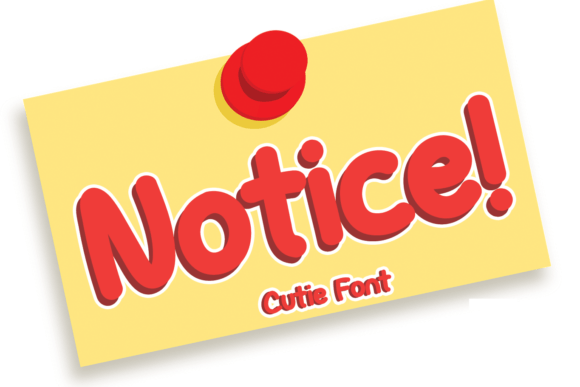
At first glance, Notice feels like a conversation starter. Its hand-lettered style gives it a personal touch, while the structured curves and balanced proportions ensure readability. This blend of informality and elegance makes it ideal for projects where you want to express creativity without sacrificing clarity. Unlike many display fonts that lean too heavily into one style—either overly ornate or starkly minimalist—Notice walks the line between fun and functional.
The font’s versatility stems from its ability to adapt to different tones and themes. It can feel whimsical when paired with bright colors and playful layouts, or sophisticated when used in monochrome schemes with ample white space. This dual nature means designers can experiment with how it looks across various formats and still maintain a cohesive visual identity.
Creative Possibilities with Notice
Let’s dive into some real-world applications where Notice shines:
- Brand Identity Design: Use Notice for taglines, brand names, or signature elements. Its distinctiveness helps create a memorable impression, especially for lifestyle brands, boutique shops, or creative agencies.
- Social Media Graphics: From Instagram posts to Twitter headers, Notice adds a stylish edge to short-form text. Pair it with simple sans-serif fonts for body copy to keep the message clear and engaging.
- Print Media: Think invitations, posters, or packaging. The font's texture and weight variations make it suitable for both bold headlines and delicate accents, depending on how you apply it.
- Web Design: While display fonts should be used sparingly online, Notice works well for section headings, call-to-action buttons, or hero banners. Ensure sufficient contrast and legibility by choosing appropriate sizes and background colors.
- Editorial Layouts: In magazines, blogs, or newsletters, use Notice for pull quotes, titles, or chapter headings. It breaks up text visually and invites readers to pause and engage with key points.
One of the joys of working with Notice is its ability to reflect tone. Want something warm and inviting? Go with a lighter weight and softer color palette. Need to make a strong statement? Lean into bolder weights and dynamic spacing.
How to Style Notice Creatively
Styling a font like Notice involves more than just selecting a typeface—it's about layering design choices to highlight its personality. Here are a few styling tips:
- Layer with textures: Apply subtle gradients, shadows, or even watercolor effects to enhance the hand-lettered feel.
- Use spacing creatively: Adjust tracking and leading to emphasize rhythm. Wide spacing can give it a modern vibe, while tighter settings add urgency or intimacy.
- Combine with illustrations: Since Notice has a visual presence, pairing it with custom illustrations or flat vector art creates a harmonious look that feels curated.
- Play with orientation: Rotate the text slightly or arrange it vertically for unexpected impact, especially in poster or infographic designs.
- Limit its use: Because it's a display font, using it excessively can overwhelm viewers. Reserve it for headlines or focal points to maintain balance.
Adapting Notice for Different Audiences and Goals
Depending on who you're designing for, you might tweak how you use Notice. For example:
- Designers: Incorporate it into mood boards or client presentations to showcase creative direction. It adds a sense of originality and thoughtfulness.
- Marketers: Use it for promotional materials like flyers, email headers, or event banners. Its eye-catching nature helps drive attention to key messages.
- Bloggers & Publishers: Feature it in blog titles, newsletter covers, or article highlights. It adds a human touch that resonates with audiences looking for authenticity.
- Entrepreneurs: Try it for product names or branding elements. It can help differentiate your offerings in crowded markets.
- Educators: Apply it in educational infographics or presentation slides. The font can make complex information feel more approachable and engaging.
- Hobbyists: Add it to handmade greeting cards, scrapbooks, or DIY home decor. Its friendly yet stylish appearance fits perfectly into personal projects.
When adapting Notice for specific platforms or goals, consider the context. On mobile devices, avoid small sizes that may distort the font’s details. In print, take advantage of high-resolution rendering to show off every curve and stroke. Always pair it with a complementary font to guide the reader through the full layout smoothly.
Realistic Examples to Inspire You
Here are a few scenarios where Notice could fit naturally and effectively:
- A local bakery uses Notice in their logo to evoke warmth and artisanal quality. The name “Sweet Haven Bakery” appears in a light version of the font, paired with a soft pastel gradient.
- A lifestyle blogger incorporates Notice into her website’s header for each new post. The title "Weekend Getaway Essentials" stands out against a clean white background, drawing readers in instantly.
- An independent bookstore prints seasonal posters with Notice for their sale announcements. Phrases like “New Arrivals Inside!” are bold and playful, encouraging foot traffic.
- A freelance designer includes a small block of Notice in his portfolio site under the heading “About Me,” giving the page a personal, handcrafted feel.
These examples show how a single font can be adapted to suit multiple purposes, all while maintaining a consistent and appealing visual language.
Maintaining Clarity and Consistency
While Notice is undeniably charming, it's important to remember that its primary role is to support your message—not overshadow it. To keep your work effective and audience-friendly, follow these best practices:
- Test at scale: Check how it looks on screens and in print. Avoid overusing ligatures or flourishes if they compromise legibility.
- Balance with simpler fonts: Pair it with a neutral, readable typeface like Helvetica or Lato to prevent visual fatigue.
- Stay consistent: Choose one or two weights and stick with them throughout your project to maintain a unified look.
- Consider cultural context: Some characters or shapes in Notice might not resonate well in certain regions or industries. Always tailor your choice to the audience.
By applying thoughtful design principles alongside the font’s natural appeal, you can ensure your creative output remains both striking and professional.
Where to Find and Use Notice
If you’re ready to try Notice for your next project, start by sourcing it from trusted font libraries such as Adobe Fonts, Google Fonts, or direct purchases from foundry websites. Always verify licensing agreements before using it commercially or publicly.
Once installed, integrate it into your favorite design tools like Adobe Photoshop, Illustrator, Canva, or Figma. These platforms allow you to adjust size, color, and effects easily to match your vision.
You can also explore font pairing generators online to find the perfect companion for Notice. Look for fonts that offer a strong contrast in weight and style to create a compelling visual hierarchy.
Why Notice Belongs in Your Toolkit
In an era where visual content dominates, having access to fonts like Notice can set your work apart. It’s not just another typeface; it’s a creative asset that can be molded to suit your needs. Whether you're building a brand, telling a story, or simply experimenting with typography, Notice offers the kind of flexibility that fuels innovation without losing focus on the fundamentals of good design.
Its quirky charm isn’t just skin deep—it encourages a sense of curiosity and engagement. Viewers don’t just see the words; they feel the intention behind them. That’s the power of a well-chosen font.
Final Tips for Getting Started
To get the most out of Notice, consider these quick recommendations:
- Start with a simple mockup to test how it interacts with your overall design.
- Don’t hesitate to customize it—add a drop shadow, outline, or even a slight rotation for extra flair.
- Keep your color palette limited to three shades max when using Notice prominently to avoid distraction.
- Study other projects that use similar styles to understand how to maximize impact without overcomplication.
- Always ask yourself: Does this font serve the message, or does it draw attention away from it?
Remember, the best fonts are those that feel intentional. With Notice, the challenge—and opportunity—is to use it in a way that enhances your voice rather than masking it.
Unlock New Ideas with Notice
Typography is often overlooked, but it plays a critical role in how people perceive your work. By choosing a font like Notice, you’re not just picking a style—you’re embracing a mindset that values creativity, clarity, and connection. Let it inspire you to think beyond the standard, to notice the subtleties in your designs, and to craft experiences that leave a lasting impression.
So go ahead—explore what Notice can do for your next project. Whether you're a seasoned designer or just beginning your creative journey, this font offers a fresh perspective on how to communicate with style and substance.