The Brush Font: A Modern Display for Creative Expression
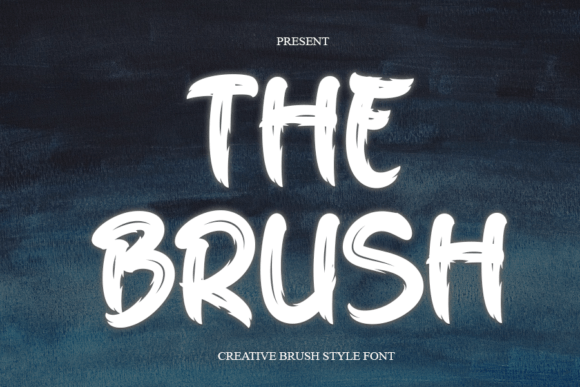
Typography plays a crucial role in how we communicate visually. Whether you're designing a logo, crafting an eye-catching social media post, or creating a personalized greeting card, the right font can elevate your message and capture attention effortlessly. The Brush is a modern brush display font that offers a fresh take on visual communication with its fluid, handcrafted aesthetic. It’s not just another typeface—it's a versatile tool that can help professionals and hobbyists alike express creativity while maintaining clarity and impact.
What Makes The Brush Unique?
The Brush mimics the natural flow of a calligraphy pen or paintbrush stroke, giving it a soft, dynamic feel. Unlike rigid sans-serif or serif fonts, The Brush has an organic quality that feels both artistic and approachable. This balance makes it ideal for applications where personality matters but readability still needs to shine through.
Its design features subtle variations in stroke weight and rhythm, which add depth and character without overwhelming the reader. These nuances allow it to adapt to different contexts—whether bold and expressive or gentle and elegant—making it more than just a decorative choice. Instead, it becomes a strategic one.
Who Can Benefit from Using The Brush?
- Creative professionals: Graphic designers, illustrators, and digital artists who want to infuse warmth into their projects will find The Brush particularly useful. Its expressive nature complements illustrations and adds a human touch to digital compositions.
- Marketers and branders: If you're working on campaigns or branding materials that require a unique yet professional look, this font can set your designs apart from the competition. It works especially well for lifestyle brands, wellness products, and creative services.
- Bloggers and content creators: When used in headers, quotes, or titles, The Brush can make blog posts, YouTube thumbnails, or Instagram graphics stand out. It adds a sense of authenticity and artistry that resonates with audiences seeking personal connection.
- Small business owners: From signage to packaging, The Brush can help create memorable visuals that reflect your brand's identity. Its flexibility across platforms means you can use it in both print and digital formats without compromising quality.
- Educators and presenters: In presentations, posters, or educational materials, The Brush can be used to highlight key points or headings, making complex information more engaging and accessible.
How The Brush Enhances Communication
One of the most valuable aspects of The Brush is its ability to convey tone and emotion effectively. Because it resembles hand-drawn lettering, it naturally evokes a sense of individuality and thoughtfulness. This can be especially powerful when used in marketing messages, invitations, or product descriptions where the goal is to connect emotionally with the audience.
Consider a small artisanal soap company launching a new line of handmade products. By using The Brush in their product labels and promotional material, they can instantly communicate the idea of craftsmanship and care. It doesn’t just look good—it tells a story.
Practical Use Cases for The Brush
Here are some real-world scenarios where The Brush could become your go-to font:
- Designing event invitations: The Brush brings a touch of elegance and charm to wedding invites, birthday cards, or anniversary announcements. It helps create a warm and inviting first impression.
- Creating social media content: For bloggers and influencers, using The Brush in headlines or captions can make posts more visually appealing and shareable. It stands out against text-heavy feeds without being over the top.
- Enhancing website headers: When used sparingly in headers or hero sections, The Brush adds sophistication and draws the user’s eye to important elements. It’s perfect for portfolio sites, boutique stores, or personal branding.
- Printing merchandise: T-shirts, mugs, and tote bags often benefit from a font that feels personal and expressive. The Brush provides that artistic flair while remaining legible at various sizes.
- Adding flair to reports or proposals: Even in more formal settings, The Brush can be used creatively in section titles or to emphasize key points. Just a few lines in this font can break up monotony and enhance engagement.
Why Choose The Brush Over Other Display Fonts?
While many display fonts offer bold or quirky styles, The Brush distinguishes itself by blending beauty with functionality. It avoids the pitfalls of overly stylized fonts that sacrifice legibility, which is essential when your message must be understood quickly and clearly.
Another advantage is its compatibility with a wide range of tools and platforms. Whether you're using Adobe Illustrator, Canva, Figma, or even PowerPoint, The Brush maintains its integrity and style across all mediums. This cross-platform consistency ensures your brand remains cohesive and recognizable wherever it appears.
Time-Saving and Efficiency Gains
Choosing The Brush isn’t just about aesthetics—it also saves time. Since it’s designed to work well in multiple contexts, you won’t need to switch between several fonts for different parts of a project. This reduces decision fatigue and streamlines your workflow, allowing you to focus more on the message and less on the formatting.
For example, if you’re creating a digital newsletter that includes a header, subheadings, and pull-out quotes, you can use The Brush consistently throughout. You’ll avoid the clutter of mixing too many fonts, which can dilute your design’s impact and confuse your audience.
Supporting Creativity and Innovation
Fonts like The Brush encourage creative thinking by offering a visually stimulating alternative to standard typography. When you see letters that look like they were drawn by hand, it sparks imagination and invites experimentation. This can lead to more innovative layouts and stronger visual storytelling in your work.
Take a teacher preparing a classroom poster. Rather than using the same generic font as every other school, The Brush allows them to craft something that feels personal and inspiring. Students may respond more positively to a lesson plan that looks intentionally designed rather than mass-produced.
Realistic Limitations and Considerations
Although The Brush is highly versatile, it’s important to consider its limitations. Like many display fonts, it may not be ideal for large blocks of body text due to its intricate strokes and spacing. However, when used appropriately—as a headline, title, or accent font—it excels.
Additionally, while The Brush is great for most platforms, always test it in your specific application. Some software might render brush-style fonts differently, especially on mobile devices. Ensuring that your chosen font displays correctly across all platforms is a smart move before finalizing any design.
Strengthening Your Visual Identity
Your visual identity is a critical part of your brand. Choosing the right font can reinforce your values and help you stand out in a crowded market. The Brush, with its modern yet classic appeal, supports a wide variety of identities—from minimalist and chic to warm and welcoming.
Imagine a boutique fitness studio using The Brush for their logo and class schedules. The font conveys movement and energy, aligning perfectly with their brand ethos. It’s not just a font; it’s a visual cue that enhances the entire experience.
Where to Find and How to Use The Brush
If you’re interested in trying The Brush, you can typically find it through popular font marketplaces like Google Fonts, Adobe Fonts, or private foundries. Always check licensing details to ensure it fits your intended usage—especially if you plan to sell products featuring the font.
Once installed, experiment with pairing it with simpler sans-serif or serif fonts for contrast. For instance, using The Brush for a heading paired with Helvetica or Georgia for body text creates a balanced, eye-catching layout. Don’t forget to adjust spacing and sizing based on the medium—digital vs. print can affect how a font performs.
Final Thoughts on Typography and Impact
In today’s fast-paced world, standing out requires thoughtful design choices. The Brush is more than a font—it’s a statement. It allows you to express creativity while maintaining professionalism, making it a rare find in the typographic landscape.
By incorporating The Brush into your next project, you’re not just choosing a font—you’re choosing a way to communicate with intention. Whether you’re an entrepreneur building a brand, a designer pushing creative boundaries, or a hobbyist expressing yourself, this font can help you achieve better results with less effort.
Give it a try in your next project. Let it inspire you to think beyond the ordinary and bring a bit more soul into your designs. And remember, while The Brush is a fantastic option, always evaluate whether it fits your specific needs and audience expectations.