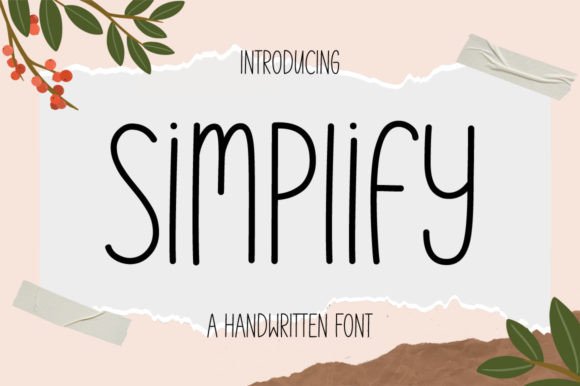
The Versatility of the Simplify Handwritten Font in Modern Design
Fonts play a crucial role in visual communication, and choosing the right one can elevate the impact of any design project. Among the many available options, handwritten fonts have gained popularity for their ability to convey warmth, authenticity, and creativity. One such font that has captured the attention of designers, educators, and content creators is Simplify. With its clean and simple-lettered style, Simplify brings a unique charm to chalkboard quotes, teaching materials, branding projects, and more.
What Makes Simplify Stand Out?
Simplify is not just another cursive or script font; it’s a carefully crafted typeface designed to mimic natural handwriting while maintaining clarity and consistency. The strokes are smooth, the spacing is balanced, and the characters retain a realistic, hand-drawn appearance without sacrificing legibility. This makes it especially suitable for designs where a personal touch is essential but readability cannot be compromised.
Unlike overly stylized or decorative fonts that may become difficult to read at smaller sizes, Simplify maintains its elegance across various applications. Whether you're creating large signage for a classroom or small text for a greeting card, this font adapts well and preserves its charm. Its simplicity allows it to blend into different contexts, from casual social media posts to professional presentations with a creative twist.
Key Characteristics of the Simplify Font
- Clean Lettering: Each character is designed with minimal embellishment, making it easy on the eyes and ideal for long-form text.
- Handwritten Aesthetic: It mimics the organic flow of human handwriting, giving your designs an authentic and approachable feel.
- Versatile Style: Works well in both formal and informal settings due to its balanced look.
- Customizable Variations: Many versions of the font exist, including bold, italic, and shadowed styles, offering flexibility for different design needs.
Practical Applications of Simplify
One of the most common uses for the Simplify font is in educational environments. Teachers often use it to create engaging posters, lesson plans, and motivational quotes for students. Its friendly and approachable nature helps make learning materials more inviting and less intimidating. For example, a teacher might use Simplify to write a welcome message on a classroom whiteboard, instantly setting a warm and welcoming tone for the day.
Another popular application is in branding and marketing. Small businesses, especially those in the food, fashion, or lifestyle industries, often adopt handwritten fonts like Simplify to give their brand a more personal and artisanal feel. Think of a boutique café using it for their menu board or a handmade soap company using it on product labels. These choices help establish a connection between the brand and the customer by suggesting craftsmanship and care.
In digital spaces, Simplify finds its place in website headers, blog titles, and even app interfaces. When used sparingly and strategically, it can draw attention to key messages or calls to action. However, overuse should be avoided to maintain the professionalism of the overall layout.
Real-World Examples of Simplify Use
- Chalkboard Quotes: Wedding planners frequently use Simplify for custom chalkboard signs. The font’s resemblance to actual handwriting gives these displays a rustic, heartfelt appeal.
- Teaching Materials: Educators love how Simplify enhances student engagement. A science teacher might use it to annotate diagrams or highlight important formulas in a visually appealing way.
- Event Signage: From birthdays to corporate events, Simplify adds a personalized touch to directional signs, thank-you boards, and program titles.
- Instagram Captions: Content creators use it in social media graphics to add visual interest and differentiate their posts from standard text-based captions.
Why Choose Simplify Over Other Handwritten Fonts?
While there are numerous handwritten fonts available, Simplify distinguishes itself through its balance of form and function. Some fonts prioritize artistic flair over readability, which can limit their usability. Others may appear too rigid or artificial, failing to capture the spontaneity of real handwriting. Simplify strikes a perfect middle ground — it feels genuine yet remains structured enough to serve practical purposes.
This font also excels in adaptability. It works well in both color and black-and-white settings, making it suitable for print and digital media alike. Additionally, its clean lines allow it to pair effectively with other fonts. For instance, combining Simplify with a sans-serif font in a presentation can emphasize the title while keeping the body text clear and modern.
Advantages of Using Simplify
- Enhances the emotional appeal of your designs with a personal and handcrafted look.
- Offers excellent legibility, even in larger text blocks.
- Is compatible with a wide range of platforms and software, including Adobe Creative Suite and Google Fonts.
- Provides a consistent aesthetic that still retains the natural variation seen in real handwriting.
- Can be customized to suit specific design goals, such as adding shadows or outlines for emphasis.
Design Considerations When Using Simplify
Despite its versatility, Simplify is best used when certain design principles are followed. Since it mimics handwriting, it may not be the best choice for high-volume text or technical documents. Instead, reserve it for headlines, accents, and short phrases where it can shine without overwhelming the reader.
Color contrast is another factor to consider. Because of its soft and flowing nature, Simplify benefits from being placed against solid or contrasting backgrounds. For example, using it in white letters on a dark background can create a dramatic effect, whereas placing it on a light-colored or textured surface may enhance its chalkboard-style appearance.
Spacing and alignment also matter. While the font itself is designed to look natural, overcrowding or misaligning the text can reduce its effectiveness. Always ensure that the text is given enough room to breathe, especially if you're layering it over images or using it in a busy layout.
When Not to Use Simplify
- For body text in long articles or reports.
- In highly formal or corporate settings where a more traditional font is preferred.
- With very small font sizes where legibility becomes an issue.
- As the primary font in multi-language projects unless a version supports the required characters.
How to Integrate Simplify Into Your Workflow
If you're considering using Simplify in your next project, here are some tips to get started:
- Download and Install: Most platforms offer downloadable versions of Simplify, which can be installed directly onto your computer for use in design software.
- Use Online Tools: If you prefer not to install anything, online tools and editors like Canva or Figma often include Simplify in their font libraries.
- Experiment with Styles: Try out the bold, italic, or outlined variations of Simplify to see what works best for your specific purpose.
- Pair Thoughtfully: Combine Simplify with complementary fonts to create visual harmony. A serif or sans-serif font can provide a strong contrast and balance.
- Test Legibility: Before finalizing your design, test how Simplify looks at different sizes and in different mediums to ensure it remains readable and effective.
Tools That Support Simplify
Trends and Future Relevance
Handwritten fonts like Simplify continue to be relevant in today's design landscape. As consumers increasingly seek authenticity and relatability in brands and content, fonts that reflect a human touch will remain in demand. In particular, the rise of remote learning and virtual classrooms has led to a surge in the use of chalkboard-style fonts for digital educational resources.
Moreover, with the growing popularity of minimalist design aesthetics, Simplify fits perfectly into this trend. Its understated elegance allows it to complement modern layouts without clashing. Whether it's a startup logo, a coffee shop menu, or a teacher’s resource guide, Simplify brings a sense of simplicity and sincerity that resonates with audiences.
Looking ahead, the font is likely to evolve with new weights and features to support emerging design trends. As long as there is a need for expressive yet functional typography, Simplify will remain a go-to option for designers who value both beauty and usability.
Observations on Current Usage
- Many influencers use Simplify for Instagram quote cards and promotional banners.
- It appears frequently in home décor projects, such as wall art and DIY sign-making.
- Educational institutions and tutoring centers incorporate it into study guides and interactive whiteboards.
- Business owners choose it for branding to foster a community-driven image.
Final Thoughts on Simplify
The Simplify font is more than just a typographic choice — it's a tool for enhancing user experience and conveying personality. Its combination of simplicity and expressiveness makes it a favorite among educators, creatives, and business professionals alike. Whether you're designing a classroom poster or crafting a social media graphic, Simplify offers a fresh, modern take on handwritten typography that won't disappoint.
By understanding its strengths and limitations, you can leverage Simplify to create compelling visuals that speak directly to your audience. As with any design element, thoughtful application is key. Use it to highlight, not overwhelm, and let its natural charm shine through in all the right places.