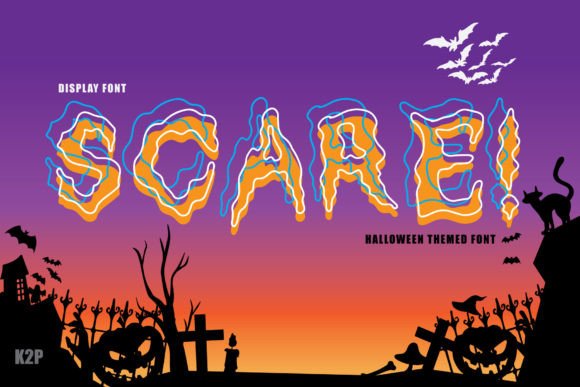
Scare: The Spooky Display Font for Halloween Creations
Halloween is a time of the year when creativity takes center stage. Whether you're designing invitations, posters, or digital content, the right font can make all the difference in setting the tone and capturing attention. Scare, a thick-lettered and spooky display font, has become a favorite among designers and crafters looking to add an eerie flair to their projects. In this article, we’ll explore what makes Scare unique, common mistakes people make when using it, and how to get the most out of this versatile typeface.
What Makes Scare a Great Choice?
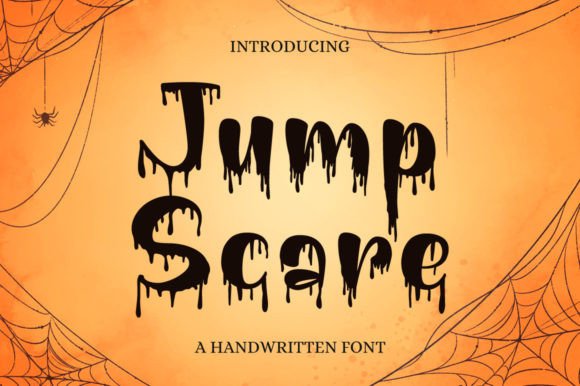
Scare is a display font designed with Halloween aesthetics in mind. Its bold, chunky letters and haunting character shapes give it a distinct personality that stands out on any canvas. Unlike generic fonts, Scare offers a visual impact that’s both spooky and stylish, making it ideal for:
- Event promotions and haunted house signs
- Invitations and party announcements
- Craft projects like handmade cards and decorations
- Blog headers and social media graphics
- Merchandise such as t-shirts, mugs, and novelty items
Its versatility doesn’t stop there. Educators might use it for themed classroom materials, while entrepreneurs could leverage it for seasonal marketing campaigns. Marketers and bloggers often find that incorporating a visually striking font like Scare into their designs increases engagement and brand memorability during the Halloween season.
Common Mistakes When Choosing and Using Scare
While Scare is an excellent choice for many applications, it's not without its pitfalls. One common mistake is using it in situations where legibility is more important than style. Because it’s a decorative display font, it may be difficult to read in smaller sizes or in long blocks of text. This can lead to confusion or frustration for viewers who need to process information quickly.
Another frequent oversight is pairing Scare with other fonts that clash in style or weight. Display fonts are meant to stand alone or complement simpler, sans-serif or serif fonts used for body text. Mismatching can result in a design that feels chaotic rather than cohesive.
Some users also fail to consider the licensing terms before downloading or purchasing Scare. It's essential to verify whether the font is appropriate for commercial use, especially if you're creating products for sale or promotional materials for a business. Ignoring these details can lead to legal issues down the line.
Mistake 1: Overusing Scare in All Text Elements
A major error is using Scare for every part of a design, including headlines, subheadings, and body text. While it shines in short, impactful phrases, using it throughout a document can overwhelm the reader and reduce clarity.
Better Approach: Reserve Scare for headlines and titles where it can command attention. Use a clean, readable font like Arial or Georgia for the supporting text. For example, a Halloween event poster with Scare as the headline title and Calibri for the event details will balance style and function effectively.
Mistake 2: Poor Color and Background Pairing
Because Scare has a bold, dark appearance, some creators mistakenly pair it with similarly dark or busy backgrounds. This can cause the text to blend in rather than stand out, diminishing the overall impact of the design.
Better Approach: Choose high-contrast color combinations. White text over a black background, or orange against navy blue, can enhance visibility and emphasize the spooky vibe. Always preview your design in different lighting conditions to ensure readability.
Mistake 3: Not Checking Licensing Before Commercial Use
Many people overlook the importance of font licensing when they're excited about a new project. If you're planning to sell items featuring Scare, it's crucial to confirm that the license allows for commercial usage. Some free fonts only permit personal use, which can limit your options later on.
Better Approach: Always review the font’s license agreement before finalizing a design for public or commercial distribution. If necessary, invest in a premium version that includes broader usage rights. This step can save you from costly rebranding or redesign efforts.
When to Avoid Scare
Although Scare is perfect for Halloween-themed work, it isn't always the best option. Here are a few scenarios where it might not be suitable:
- Formal Documents: Legal notices, reports, or academic papers require clear, professional fonts. Scare would appear unprofessional and distract from the message.
- Web Body Text: On websites or apps, where large amounts of text are displayed, using Scare could hinder user experience due to reduced readability.
- International Projects: If your audience speaks multiple languages, ensure that Scare supports the necessary characters and glyphs. Limited language support can create formatting issues.
How to Get the Most Out of Scare
To maximize the effectiveness of Scare in your designs, keep the following tips in mind:
- Use Sparingly: Apply it to key elements like headlines or logos. This ensures it remains impactful without overwhelming the rest of the design.
- Experiment with Effects: Add subtle effects like drop shadows, outlines, or texture overlays to enhance the spooky feel. These touches can help the font pop but should never compromise legibility.
- Pair Thoughtfully: Match Scare with a neutral font for body text to maintain a balance between creativity and clarity.
- Test Across Devices: Ensure that the font displays correctly on various screens, including mobile devices. Sometimes, bold display fonts can lose their sharpness on lower-resolution displays.
Realistic Example: A Halloween Party Invitation
Imagine you're designing a Halloween party invitation. You choose Scare for the main title, "Spooktacular Night Out," and then switch to a simple sans-serif like Helvetica for the event details. You add a red outline around the title to make it stand out against a green background. The result is a festive, easy-to-read design that grabs attention and delivers the necessary information clearly.
Before You Decide to Use Scare
Here’s a checklist to help you determine if Scare is the right fit for your project:
- Is the purpose of the design aesthetic-driven or informational?
- Will the text be viewed in low-light environments (e.g., outdoor events)?
- Do you plan to use it in a multilingual context?
- Does your target audience include children or elderly individuals who may struggle with dense lettering?
- Are you aware of the font’s licensing restrictions?
Answering these questions honestly can guide you toward better design choices and prevent unnecessary revisions later on.
Alternatives to Consider
If Scare doesn’t meet your needs or you’re looking for variety, consider similar spooky fonts that offer different vibes:
- Creepster: Another Halloween favorite with jagged edges and a sinister feel.
- Deadpool: Offers a ghostly look with soft curves and thin strokes.
- Notte: Provides a mysterious, gothic appeal that works well in darker themes.
These alternatives can provide flexibility depending on your specific requirements and creative vision.
Where to Find and Download Scare
Scare is available on several font marketplaces. You can download it from platforms like Font Squirrel, MyFonts, or DaFont. Always ensure you’re downloading from a reputable source to avoid malware or counterfeit versions.
Some sites offer free versions with limited licenses, while others require a purchase for full access. Compare features and pricing across platforms to find the best deal for your needs.
Final Thoughts on Using Scare Creatively
The beauty of Scare lies in its ability to evoke emotion and set the mood instantly. However, like any powerful tool, it requires thoughtful application. By avoiding common pitfalls—such as overuse, poor pairing, and ignoring licensing—you can harness its potential to create memorable Halloween content.
Remember, the goal is to enhance your message, not obscure it. Use Scare as a highlight, not a default. Test your designs in real-world settings and gather feedback to refine your approach. With the right strategy, Scare can become a cornerstone of your Halloween branding and design toolkit.