Swamp Font: Spooky and Stylish for Your Creations
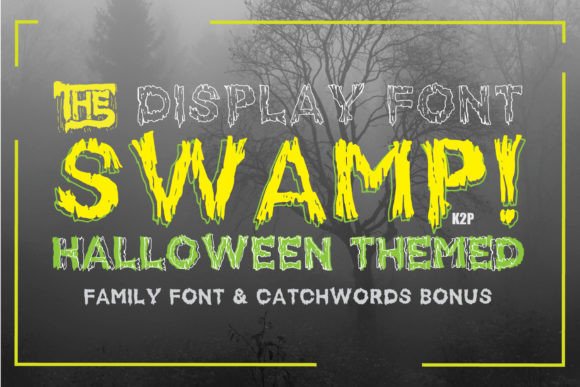
If you're looking to add a touch of eerie charm to your designs, Swamp is the font you need. This thick-lettered and spooky display typeface brings an unsettling yet captivating vibe to any project. Whether you're creating Halloween decorations, marketing materials, or personal crafts, Swamp offers a bold and imaginative aesthetic that stands out.
What Makes Swamp Unique?
Swamp is more than just another Halloween font; it’s a character-driven style that evokes a sense of mystery and darkness. The letters are heavily weighted, with jagged edges and uneven spacing that mimic the rough textures often found in horror-themed visuals. These features make it ideal for eye-catching headlines, titles, or any text where you want to create an immediate emotional impact.
Key Features of Swamp
- Thick Lettering: The bold strokes give the font a strong presence on both digital and print media.
- Spooky Aesthetic: Designed with Halloween in mind, each letter feels like it was carved from ancient wood or dripping with shadowy secrets.
- High Readability Despite Style: Though dramatic, Swamp maintains enough clarity for short bursts of text, making it practical as well as artistic.
- Wide Compatibility: It works seamlessly across various design platforms and software, allowing for easy integration into your workflow.
Why You Should Care About Swamp
Designers and content creators often struggle to find fonts that balance visual appeal with functionality. Swamp solves this by offering a unique look without compromising too much on legibility. Its distinctiveness can help you stand out in crowded markets or simply bring a fun twist to seasonal projects.
For entrepreneurs running themed businesses—like haunted house rentals or costume shops—this font can become a signature element of their branding. Bloggers and marketers can use it to spice up social media posts, promotional banners, or event invitations related to Halloween, fantasy themes, or anything requiring a mysterious tone.
Real-World Use Cases
- Halloween Party Invitations: Imagine sending out invites with Swamp for the title. The thick, spooky letters will immediately set the mood and grab attention.
- Book Covers or Zines: If you’re publishing a horror story, poetry collection, or DIY zine, Swamp adds an authentic, handcrafted feel that resonates with readers.
- Merchandise Design: T-shirts, mugs, posters, and other Halloween-themed merchandise benefit greatly from Swamp's edgy appearance.
- YouTube Titles or Thumbnails: Content creators can use Swamp to make their videos pop, especially if they focus on horror, gaming, or niche art topics.
- Website Headers: Blogs or websites with a dark theme or seasonal focus can enhance their identity using Swamp in headers or call-to-action buttons.
How to Use Swamp Effectively
While Swamp is undeniably striking, it’s important to use it wisely. Display fonts like this work best when used sparingly—for example, in titles rather than full paragraphs. Overusing it can lead to readability issues and may overwhelm the viewer.
Beginners might start by pairing Swamp with simpler, sans-serif fonts in body text to maintain contrast and balance. For instance, use Swamp for a product name and then switch to Arial or Helvetica for descriptions or pricing. This ensures your message remains clear while still leveraging the font’s bold personality.
Tools and Platforms That Support Swamp
Most modern design tools support custom fonts, so you can easily access Swamp through platforms like:
- Adobe Photoshop and Illustrator
- Canva (via web-based font upload)
- Microsoft Word or PowerPoint
- Google Docs (after installing via Google Fonts or similar services)
- Web development frameworks using @font-face
Choosing the Right Color and Background
The effectiveness of Swamp also depends on its presentation. Since it’s a thick, bold font, pairing it with contrasting colors and simple backgrounds tends to highlight its features best. Think about using it in black against a pale yellow or white background to simulate an old parchment look, which enhances its spooky vibe.
Alternatively, try ghostly white on a deep green or purple backdrop for a truly haunting effect. Don’t be afraid to experiment with textures either—adding subtle watercolor effects or paper grain can elevate the overall design significantly.
Things to Keep in Mind Before Using Swamp
Before diving into your next project with Swamp, consider the following:
- Audience Appropriateness: While Swamp is perfect for Halloween, it may not suit all audiences. Ensure it aligns with your brand voice and target demographic.
- Legibility: Avoid using it in small sizes or for long-form text where readability is crucial.
- Font Licensing: Always verify whether Swamp is free for commercial use or requires a purchase. Some display fonts come with restrictions that could affect your business applications.
- Design Balance: Pair Swamp with clean, minimalist elements to avoid clutter and keep the focus on the message.
Getting Started with Swamp
For those new to using display fonts, here’s a quick way to get started:
- Download or install Swamp from a trusted font marketplace or website.
- Open your design tool and select Swamp from the font menu.
- Type a short phrase or headline that matches the spooky or crafty tone of your project.
- Experiment with different colors, sizes, and layouts until the design feels right.
- Use it in your final project and share it with your audience!
Pro Tips for Advanced Users
Experienced designers can take Swamp even further by layering it with other typographic effects. Try adding a slight drop shadow or texture overlay to give it depth. You can also combine multiple lines of Swamp text with varying opacities to create a layered, ghostly appearance.
Another idea is to pair it with hand-drawn illustrations or vintage-style graphics. Swamp complements these styles beautifully, enhancing the overall theme of your project. Just remember to always test your designs on different screens and print formats to ensure consistency and quality.
Where to Find Swamp
To download Swamp, visit reputable font sites like Dafont, Google Fonts, or Adobe Fonts. Make sure to read the licensing agreement before downloading to confirm whether it suits your intended use. Once installed, you can start experimenting with its eerie potential right away.
Final Thoughts
Fonts play a powerful role in shaping the tone and impact of a design. With Swamp, you have a versatile tool that can breathe life into Halloween events, creative projects, or even seasonal promotions. The key is to understand when and how to use it effectively—keeping it bold but balanced, spooky but smart.
So go ahead, let Swamp inspire your next creation. From haunted house signage to Instagram captions, this font is ready to turn your ideas into something unforgettable. As the saying goes, the only limit is your imagination—and Swamp is there to help you push it further.